










BLACK FRIDAY

2× credits · Ends Dec 1

Ends Dec 1, 11:59 pm PTGrab 2× credits
Self Hug Sketch AI Video

Upload one clear adult portrait to make a self hug sketch AI video with a drawn version of you on the wall. A full-body photo works well. The template supplies the action and prompt.

Upload Your Portrait0/1

JPG / PNG / WebP · 1 file · Max 20 MB per file

Styling note (optional)
0/400
Resolution
Number of outputs
Public Visibility
Required credits
77
Sample videos

Self Hug Sketch AI Video From One Photo

One portrait, two versions of you, one quiet embrace.

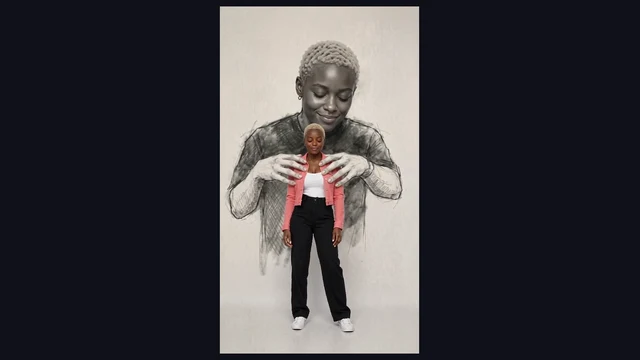
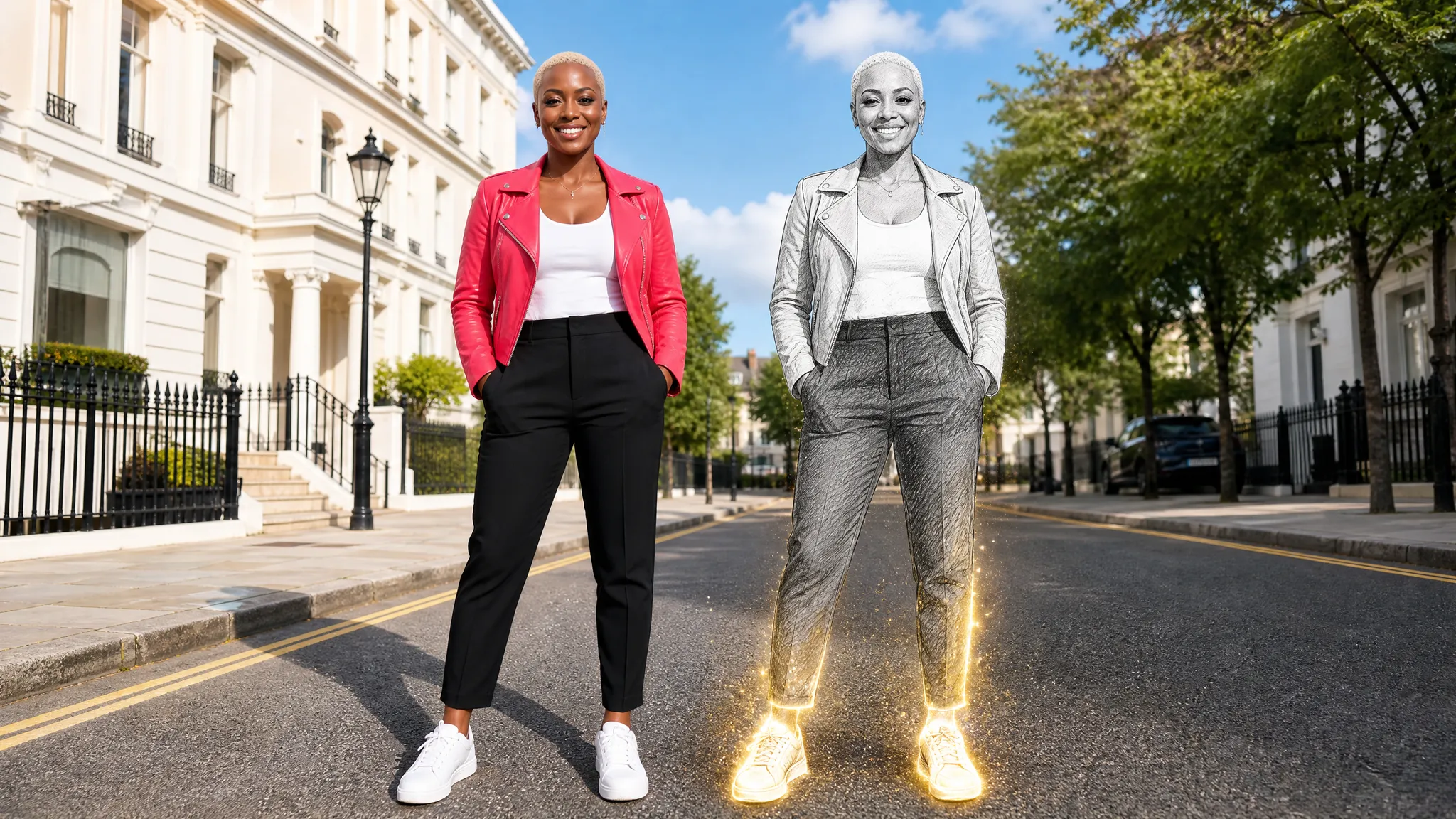
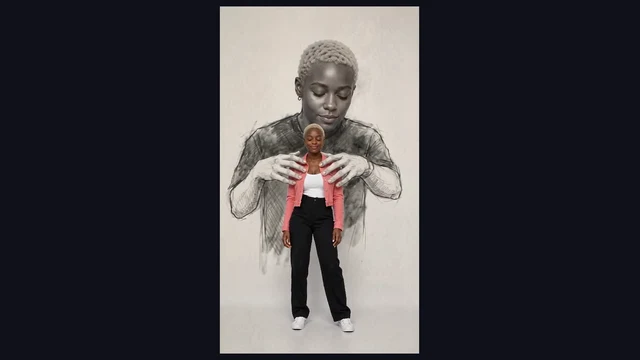
Upload one adult portrait to make an eight-second self hug sketch AI video of your wall drawing reaching around you, with no prompt to write. A familiar face appears twice: once in color and again as a larger black-and-white portrait on the wall. Watch the drawn arms lift from the sides, reach around the shoulders and settle into an embrace while the camera holds the whole scene.

Bring a portrait from a meaningful day or try the effect with an everyday photo. The template prepares the framing, movement and sound, so you can focus on the photo and watch the complete eight-second clip before you save it.

Create My Self Hug Sketch Video
Color portrait in a coral jacket with a graphite self-portrait behind her
1 Adult Portrait|8 Seconds With Sound|Vertical Video|Prepared Motion

How to Make a Self Hug Sketch AI Video

Make a self hug sketch AI video in four steps, from selecting a photo to saving the finished embrace.

1

Choose a Single Portrait

Choose one clear adult portrait with your face and shoulders visible. A standing photo with even light and your arms at your sides gives the template a clear view of your face, hair and outfit.

2

Upload Your Photo

Add your chosen photo to the self hug sketch AI video workspace. Check the preview for a single, easy-to-recognize face and enough room around your shoulders so the scene has space for the drawing’s arms.

3

Generate the Embrace

Choose an available quality and start the self hug sketch AI video. The preset supplies the wall, framing and motion. Your upload provides the appearance for both the foreground portrait and its drawn counterpart.

4

Watch and Save the Full Clip

Play your self hug sketch AI video from the start and follow the drawn hands as they reach your shoulders. Check both faces and the final pose, then save the whole clip for the story you want to tell.

What Your Self Hug Sketch AI Video Shows

See how the self hug sketch AI video moves from two matching portraits to an embrace.

One Person, Two Portraits

Your self hug sketch AI video puts a color portrait in front of a larger drawing of the same person. Notice how the two faces echo each other while the jacket stays bright and the figure behind it is rendered in shades of graphite against the pale wall.
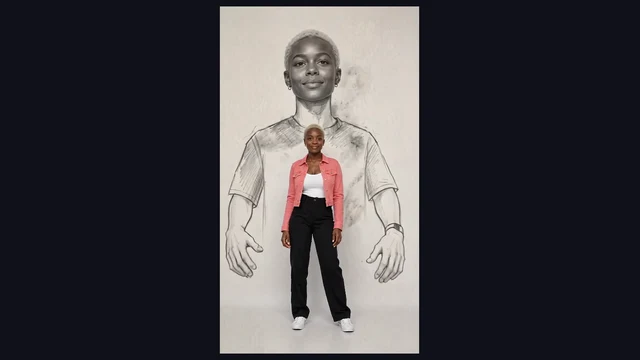
An oversized grayscale self-portrait behind the same person in color

Drawn Arms Reach Around You

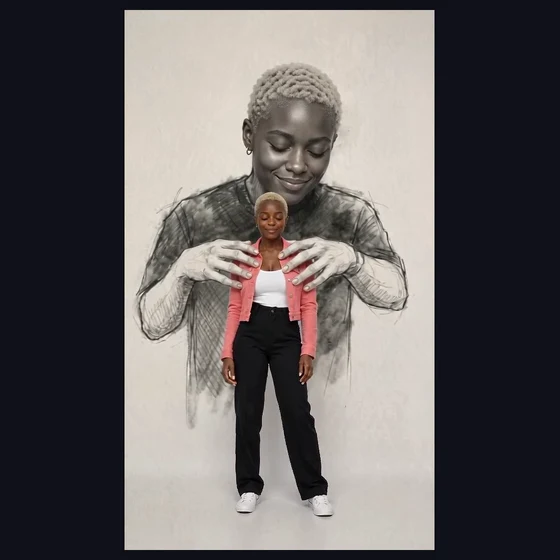
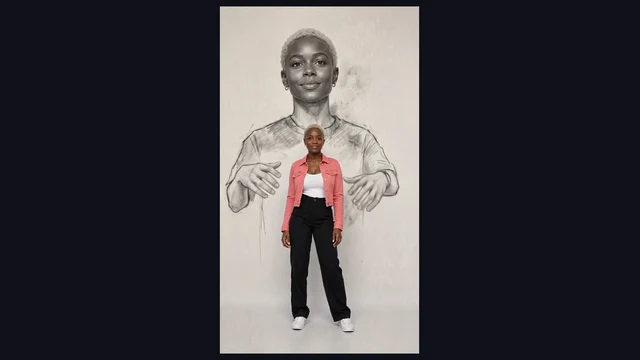
The self hug sketch begins with the drawn arms lowered. Both arms lift and come forward toward the real person’s shoulders. The movement makes the contact readable in a single view, with the pencil lines on the sleeves visible as the hands approach and come to rest.

Pencil arms rising toward the shoulders of the foreground portrait

Let the Embrace Settle

The last moments of this self hug sketch AI video give the two figures time to settle into the pose. The drawn hands stay near the shoulders while the foreground person’s expression softens. Watch the whole clip to see the moment land before choosing a still.

Drawn hands resting gently on the coral jacket at the shoulders

Ways to Share a Self Hug Sketch AI Video

Use a self hug sketch AI video as a quiet portrait, a personal message or a short mixed-media piece.

A Quiet Check-In

Choose a calm portrait for your self hug sketch AI video and send the finished embrace to a friend who knows what your week has been like. A brief message can give the gesture enough context on its own.

A Personal Milestone

Start your self hug sketch AI video with a photo from a meaningful day, such as finishing a project or starting somewhere new. The two versions of the same person make a simple visual for a moment of reflection.

A Video Journal Entry

Add your self hug sketch AI video to a personal journal or a monthly recap. Let the shoulders relax at the end of the embrace, then introduce the next scene or a single line of text.

A Mixed-Media Portrait Study

Use the self hug sketch to study how color, scale and pencil shading change the mood of a portrait. Compare the opening pose and final contact before choosing a frame to share with the clip.

Self Hug Sketch AI Video: Example Creator Stories

I picked a standing portrait for the self hug sketch AI video and used it as the last shot of my monthly journal. The pink jacket stayed bright while the wall figure remained dark. I held my caption until the drawn hands reached the shoulders so the movement had room to finish.

Maya Venn
Journal Creator

Self Hug Sketch AI Video Questions

Find out what to upload, how the self hug sketch AI video moves and what to expect from the finished clip.

A self hug sketch AI video is a short clip where a pencil-style wall portrait of you reaches around the same person in color. The drawn hands rise, settle at the shoulders and hold the embrace.

The Self Hug Sketch trend depicts someone embraced by a large drawing of their present-day self. Some versions go by “Embrace of My Own Self” or “Hug From My Own Self.” This template animates the arms within one continuous shot.

The workspace displays the credit cost of a self hug sketch AI video for the quality you select. You can preview your photo and check that price before starting.

Choose one evenly lit adult photo with a clear face and visible shoulders. A standing full-body portrait is helpful for the opening view and gives the template details to reuse in both versions of you.

The self hug sketch AI video template supplies the setting, framing and movement. Upload your portrait and start from the prepared scene. You can preview the sample first to see how the arms move.

Self hug sketch AI uses a photo of your current appearance for the real person and the pencil-style version on the wall. A childhood photo is unnecessary. Both figures depict the same present-day person.

The self hug sketch AI video preset creates an eight-second vertical 9:16 clip with sound. Play the example to see the single shot and check the available output quality in the workspace.

Watch from the first lowered-arm pose to the closing embrace. Check the likeness of both faces, the hand contact at the shoulders and whether the picture still reads as a wall portrait throughout the clip.

Create Your Self Hug Sketch AI Video

Start with one clear portrait to make a self hug sketch AI video. Preview the complete gesture, from the lowered arms to the moment the drawing settles around your shoulders, then save the clip you want to share.

Create My Self Hug Sketch Video
A quiet embrace between the color portrait and her drawn double